Spot The Station (ISS), Wolfram-Alpha
Love To Know, Tick Counter, Time And Date, Time.IS, U.S. Naval Observatory, World Time Server, Zeitverschiebung
This blog is dedicated to the discussion of gadgets, gizmos, widgets and all other kinds of technology and science.
21
Dec
19
Dec
16
Dec
| Correct Time Phone Numbers |
| CHU / NRC – Ottawa, Ontario |
|
* (613) 745-1576 |
| Memphis, TN – Time & Weather |
|
* (901) 526-5261 (JAM JAM 1) * (901) 522-8888 * (901) 203-5491 (WX Only – No Time) |
| South Florida – Correct Time |
|
* (954) 324-8811 (Broward County #1) * (954) 748-4444 (Broward County #2) * (305) 324-8811 (Miami-Dade County) |
| U.S. Naval Observatory |
|
* (202) 762-1401 (Washington, DC) * (202) 762-1069 (Washington, DC) * (719) 567-6742 (Colorado Springs, CO) |
| WWV – Fort Collins, Colorado |
|
* (303) 499-7111 |
| WWVH – Kauai, Hawaii |
|
* (808) 335-4363 |
16
Dec
| Cellular Phone Service Providers | VOIP Home Phone Service Providers |
|
* AT&T Wireless * Boost Mobile * C Spire * Consumer Cellular * Cricket Wireless * Google Fi * Great Call * H2O Wireless * Hello Mobile * Metro (by T-Mobile) * Mint Mobile * NET10 Wireless * Page Plus Cellular * Pure TalkUSA |
* Red Pocket Mobile * Republic Wireless * Sprint * StraightTalk * T-Mobile * Tello * Ting * Total Wireless * TracFone Wireless * Ultra Mobile * U.S. Cellular * Verizon Wireless * Virgin Mobile * Xfinity Mobile |
* AXVoice * BasicTalk * Lingo * MagicJack * netTALK (WiFi Duo) * Ooma * PhonePower * ViaTalk * Voiply * Vonage |
14
Dec
Hi! I am The Gadget Seeker. I was a geek long before there was a name for it.
Welcome to the GadgetRadar.com Gadget & Technology Blog.
My blog will continue to showcase awesome gadgets, websites, and other technological innovations.
I hope you will enjoy reading my blog posts. Please be sure to check back often.
14
Dec
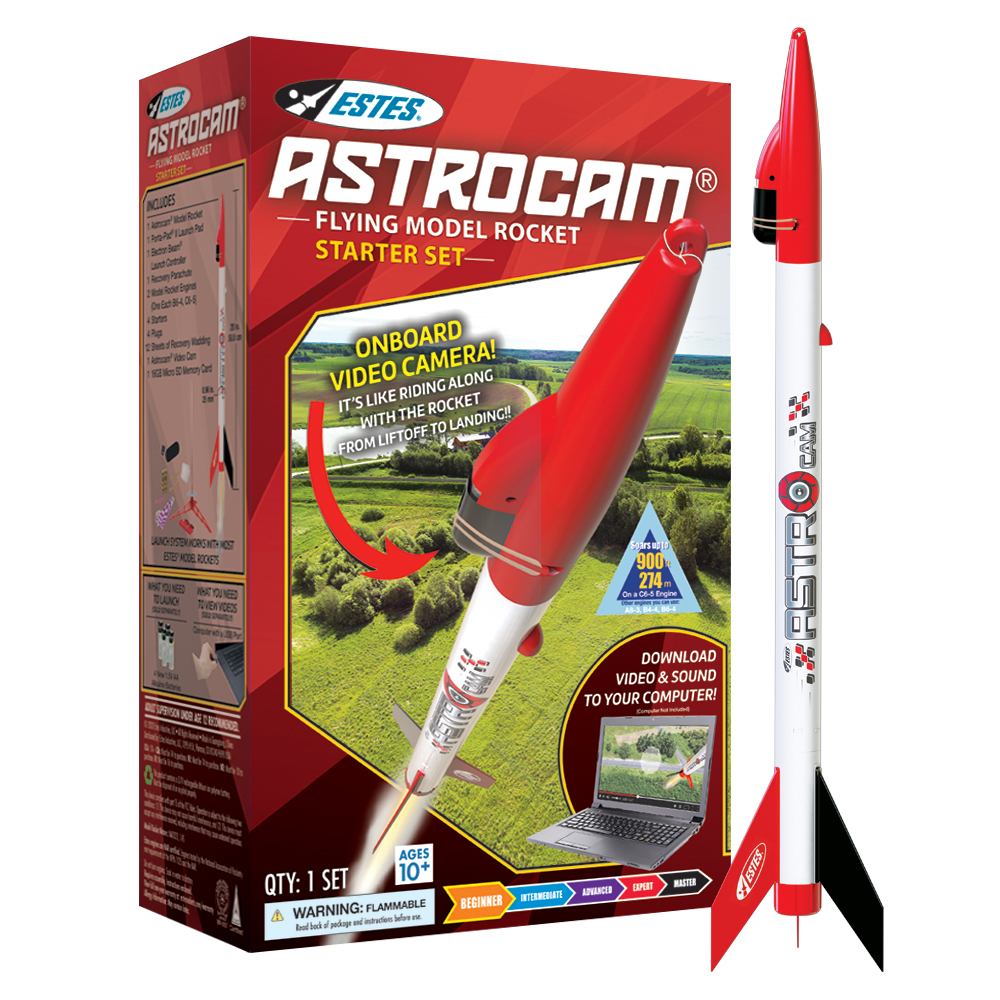
Have you ever wanted to see what your neighborhood looks like from an altitude of 1000 feet? Well, here’s your chance.
The Estes AstroCam model rocket is equipped with its own high-definition digital video camera and a specially engineered nosecone to house
the camera during flight. Start the camera while the rocket is on the launch pad and begin recording audio and video onto the
included 16GB Micro SD Memory Card. Stand back and press the launch button and the model rocket camera captures the
breathtaking sights and sounds from liftoff through recovery from onboard the rocket itself!
The Beginner-Level Astrocam rocket goes together quickly and can be ready to fly in less than 30 minutes. All parts are
pre-finished for you – build your own rocket with no gluing or painting. Each Astrocam Starter Set contains an Estes
Porta-Pad II Launch Pad and Electron Beam Launch Controller (requires four 1.5V alkaline AA batteries, not included).
The set also comes with flight supplies – two different types of engines, starters, plugs, and recovery wadding – for
your first two Astrocam launches.
WHAT YOU NEED TO BUILD: Clear tape. (Tools, construction and finishing supplies not included.)
LAUNCH SYSTEM includes Estes Porta-Pad II Launch Pad and Electron Beam Launch Controller. Four 1.5V high quality
AA alkaline batteries are also required for launch controller (not included).
12
Dec
| Webpage View |
| Type some text in the box below and then click the “Listen” button. |
| HTML Code View |
|
<script>
// Copy this script into your HTML function TTS_Speak(text) {speechSynthesis.cancel(); var text; speechSynthesis.speak(new SpeechSynthesisUtterance(text));} function TTS_Pause() {speechSynthesis.pause();} function TTS_Resume() {speechSynthesis.resume();} function TTS_Stop() {speechSynthesis.cancel();} </script>
<!– Code Example : Using the script functions above –>
<textarea id=”msg” rows=”3″ style=”width:95%;”></textarea> <button value=”Listen” onclick=”var text=document.getElementById(‘msg’).value; TTS_Speak(text);”>Listen</button> <button value=”Pause” onclick=”TTS_Pause();”>Pause</button> <button value=”Resume” onclick=”TTS_Resume();”>Resume</button> <button value=”Stop” onclick=”TTS_Stop();”>Stop</button> |
11
Dec
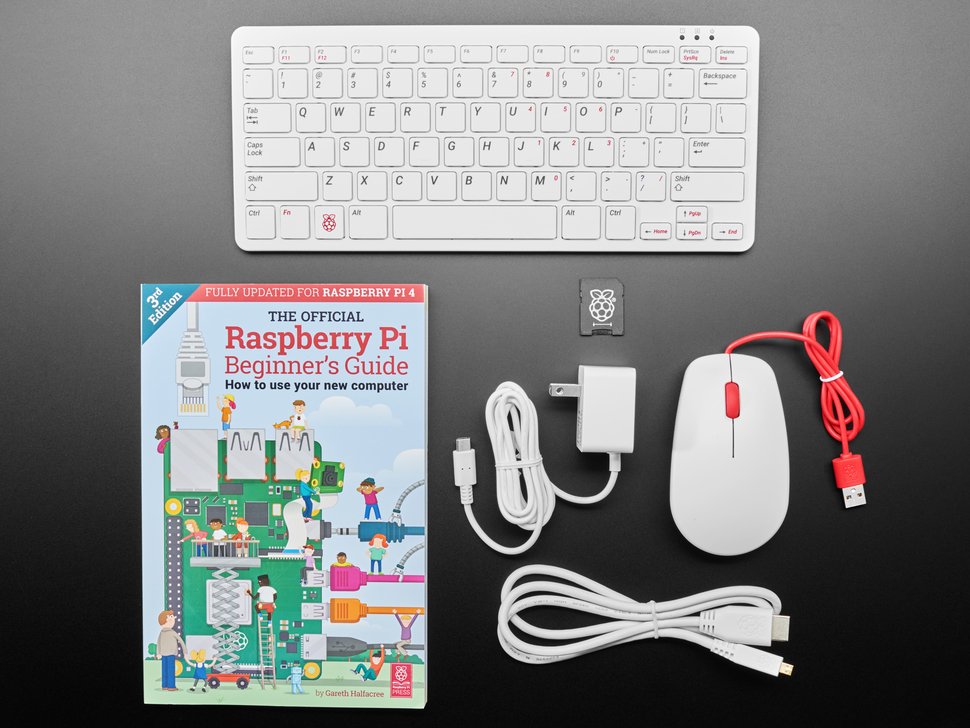
The Raspberry Pi 400 personal computer is essentially a Raspberry Pi 4 microcontroller that has been built into a computer keyboard. It runs a variant of the Linux operating system called Raspbian. The bundle shown on the left includes a mouse and the essential cables for immediate use after unboxing. All you have to supply is a monitor with an HDMI input. It comes with a ton of pre-installed software including Libre Office, which is similar in functionality to Microsoft Office. All of the Raspberry Pi’s I/O header pins are available on the back of the unit.
11
Dec
|
Airtime Pro Caster.FM Citrus3 FastCast4U Internet-Radio |
Live365 My Radio Stream Online Audience RadioBoss.FM Radio.CO |
Radio Jar Radio King Shoutcast Shout Host Stream Up |
Un_Muted VosCast Wohooo |
|
Online Radio Station Tuner
|
| Music CDs and MP3s |